Be honest: How often do you skip your warm-up? Or your cool-down?
You walk into the gym, want to get started right away, and think to yourself, “A few light reps will do the trick.” And your cool-down probably goes something like this: workout done, a quick sip of water—and then it’s back to your day.
The problem: It is precisely these two phases that often determine how well your workout actually goes and how quickly your body is ready for the next session afterward.
The good news: the warm-up and cool-down flows in the SmartWOD Workout Generator have got you covered. We'll tell you how and why!
Why warm-ups and cool-downs are so important in training
When training, many athletes focus first and foremost on the workout itself: the weights, the reps, the time on the clock. But what happens before and after has a huge impact on how well your workout goes:
A good warm-up ensures that your body is ready before things get serious. Blood flow to your muscles improves, your joints move more freely, and your nervous system is activated. The result: your movements feel more stable and controlled right from the start.
The cool-down serves a different purpose. After an intense workout, your body is still in “work mode.” Heart rate and breathing are elevated, and your muscles are tense. A targeted cool-down helps you slowly wind down. Your heart rate stabilizes, and your body begins the recovery process more quickly.
Many people underestimate this part of their workout. Yet a few minutes of stretching and mindful breathing are often exactly what your body needs after a tough workout.
That’s exactly why we’ve integrated SmartWOD Workout Generator warm-up and cool-down flows. They take the planning off your hands and provide you with a flow that fits your workout instead.
Here's how the warm-up flows work in the SmartWOD Workout Generator
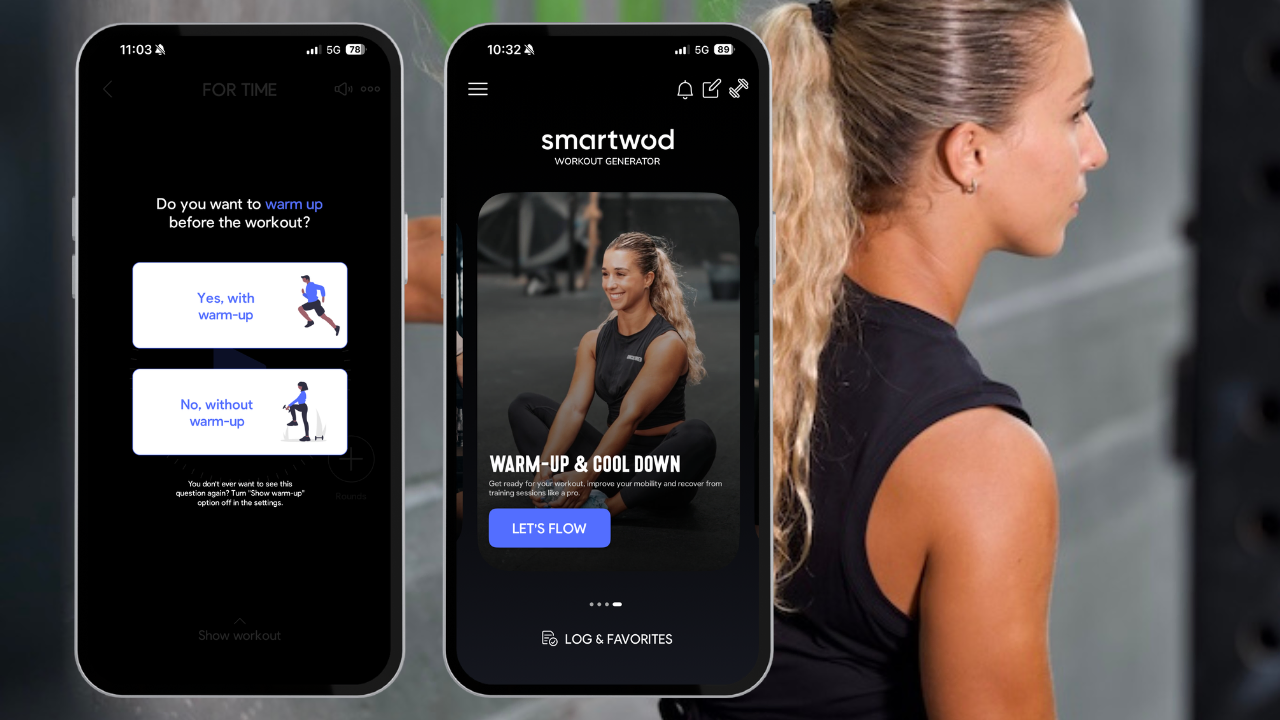
The idea behind the Warm-Up Flows is simple: you shouldn't have to spend time figuring out which exercises would be best—the app does that for you.
The SmartWOD Workout Generator automatically creates a warm-up routine tailored to your workout. For example, if your workout includes a lot of squats, lunges, or deadlifts, the focus will be more on your hips, legs, and ankles. For pull-ups or presses, the focus is more on your shoulders, back, and core.
Each warm-up flow combines three key elements:
General Warm-up Exercises
Muscle Activation
Active Mobility
General Warm-up Exercises
The first part gently gets your cardiovascular system going. The goal is to raise your body temperature and prepare your body for exercise.
Typical exercises include, for example:
Up-downs
High knees
Air squats
Lunges
These movements get your heart rate up and help your body wake up gradually.
Muscle Activation
In the next step, you'll specifically activate the muscle groups you'll need later in the workout.
These include exercises such as:
PVC Pass Throughs
Inchworm to Push-ups
Plank Toe-Taps
These movements help your body work more efficiently and perform movements with proper form—especially during more complex exercises like squats, snatches, or pull-ups.
Active Mobility
Finally, the flow includes active stretching exercises that improve your range of motion.
Typical sample exercises include:
Thread the Needle
Active Cobra
Squat to Stand
The difference from traditional stretching: Your body stays in motion. This helps prepare your joints for a greater range of motion during your workout. The result is a warm-up that not only gets you warmed up, but also specifically prepares you for your workout.
Here's how to start a warm-up in the SmartWOD Workout Generator app
It only takes a few seconds to start a warm-up in the SmartWOD Workout Generator. You have two options—depending on how you plan your workout.
Right before your workout
From the home screen
Right before your workout
When you select a workout from the SmartWOD database or create one yourself, you can start a warm-up flow right before it.
The process is very simple:
Choose a workout or create your own.
Tap “Start Warm-up ”
Start the suggested Warm-Up Flow before your workout begins.
The flow automatically adapts to the movements in your workout.
From the Home Screen
You can also start warm-ups on their own, without a workout. On the app's main screen, you'll find the Warm-Up & Cool Down tab (just swipe left to access it). Here, you can generate a flow at any time.
This is useful, for example, if you:
want to work out on the fly
just want to do a quick mobility session
want to warm up before a run or another sport
Adjust length and equipment
Not every workout starts the same way. Sometimes you have more time for a warm-up, sometimes less. That's why you can adjust the length as needed:
6 minutes
8 minutes
10 minutes
You can also choose which equipment you have available. The workout will automatically adapt to your selection. Possible options include: a PVC pole, kettlebell, or resistance bands. Or you can work out completely without equipment.
During the workout, the app shows you everything you need:
Exercise videos that demonstrate each movement
short descriptions for each exercise
a timer that guides you through the flow
You can also watch the videos in full-screen or landscape mode. And if you don't have your iPhone with you, you can start the Flow directly from your Apple Watch.
Here's how the cool-down flows work in the SmartWOD Workout Generator
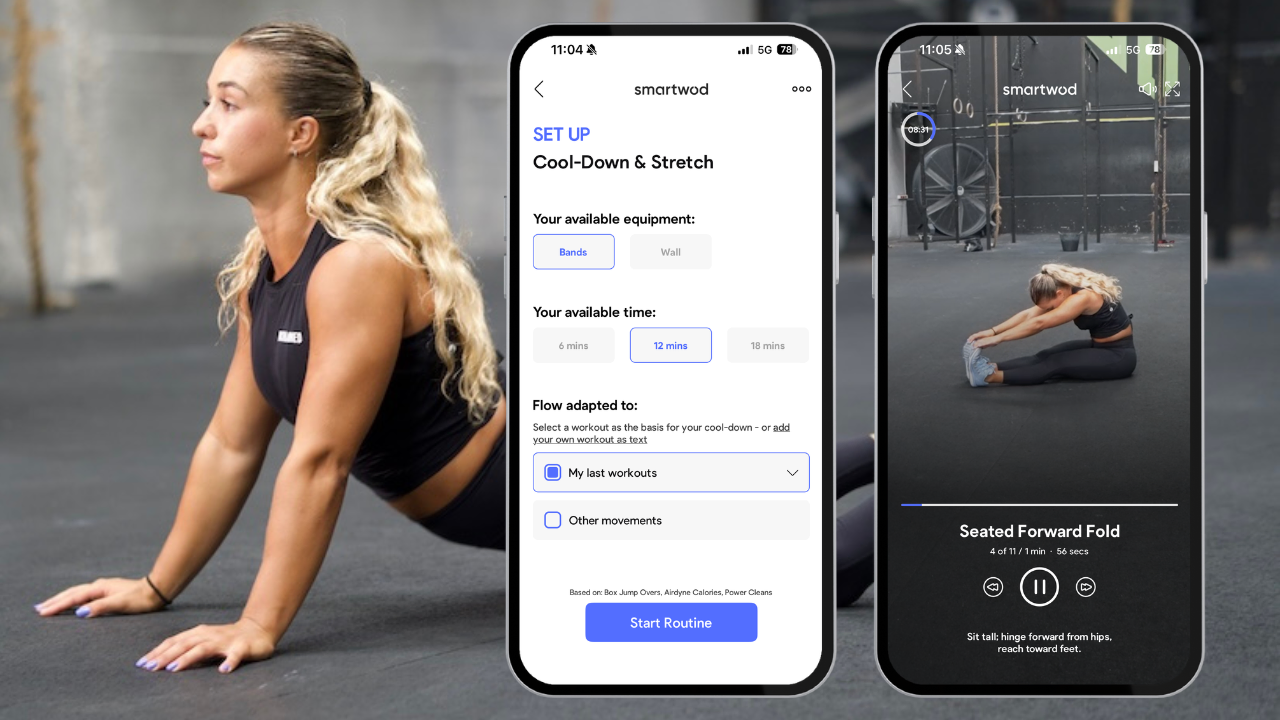
A good cool-down helps your body slowly wind down. Your heart rate stabilizes, your muscles can relax, and your body begins the recovery process more quickly.
The cool-down flows in the SmartWOD Workout Generator—just like the warm-ups—are based on the movements you’ve just performed. For example, if your workout included a lot of squats or deadlifts, the flow will focus more on your hips and back.
The cool-down generally consists of two key elements:
Passive Stretches
Breathing Exercises
Passive Stretches
The first part focuses onslow stretching poses that help release tension from your muscles and improve your flexibility.
Typical exercises include, for example:
Standing Forward Fold
V-Sit
Banded Lat Stretch
Pigeon Stretch
These positions are held a little longer so that the muscles can truly relax.
Breathing exercises
In addition, the cool-down includes targeted breathing exercises that help your body return to a state of rest.
These include, for example:
Box Breathing
Diaphragmatic Breathing
Controlled breathing calms your nervous system, lowers your heart rate, and helps your body recover more quickly.
Here's how to start a cool-down in the app
You can also start the cool-down in the SmartWOD Workout Generator with just a few clicks. Just like with the warm-up, you have two options:
Right after your workout
From the home screen
Right after your workout
The easiest way to do a cool-down flow: right after your workout.
Once you've finished your workout, you can tap “Start Cool-Down” in the app. The generator will then automatically create a flow that matches the movements you just practiced.
That way, after a strenuous workout, you no longer have to wonder which stretching exercises would be best. Just start the flow, follow the instructions, and relax.
From the Home Screen
You can also start a cool-down session independently of a workout. On the app’s home screen, you’ll find the Warm-Up & Cool Down tab—just like with the warm-up. From there, you can generate a cool-down flow at any time.
This is useful, for example, if you:
want to stretch after a run
want to incorporate a short mobility session
just want to give your body a few minutes of active recovery
Adjust the length and equipment
You can also choose the length of the cool-down. The options are:
6 minutes
12 minutes
18 minutes
You can also choose optional equipment, such as resistance bands. The app automatically adjusts the workout to your selection.
As you go through the flow, the app helps you by:
Exercise videos that demonstrate each position
short descriptions
a built-in timer
You can also turn on some calming background music to help you really unwind after your workout. If you'd rather stretch in peace, you can of course turn it off at any time.
You can also watch the videos in full-screen or landscape mode—and just like with the warm-up, you can control the flow using your Apple Watch.
Your workout doesn't start with the first set—and it doesn't end with the last
Warm-ups and cool-downs rarely fail because of a lack of motivation. More often than not, they fail because you don't want to have to think about which exercises to do right before or right after your workout.
That’s why the SmartWOD Workout Generator takes care of exactly that for you.
You start your workout, get a suggested warm-up routine, and work your way through the exercises for a few minutes. After your workout, you can immediately start a cool-down—with breathing exercises and stretches that complement what you’ve just done.
So you no longer have to worry about what to do. All you have to do is get started.